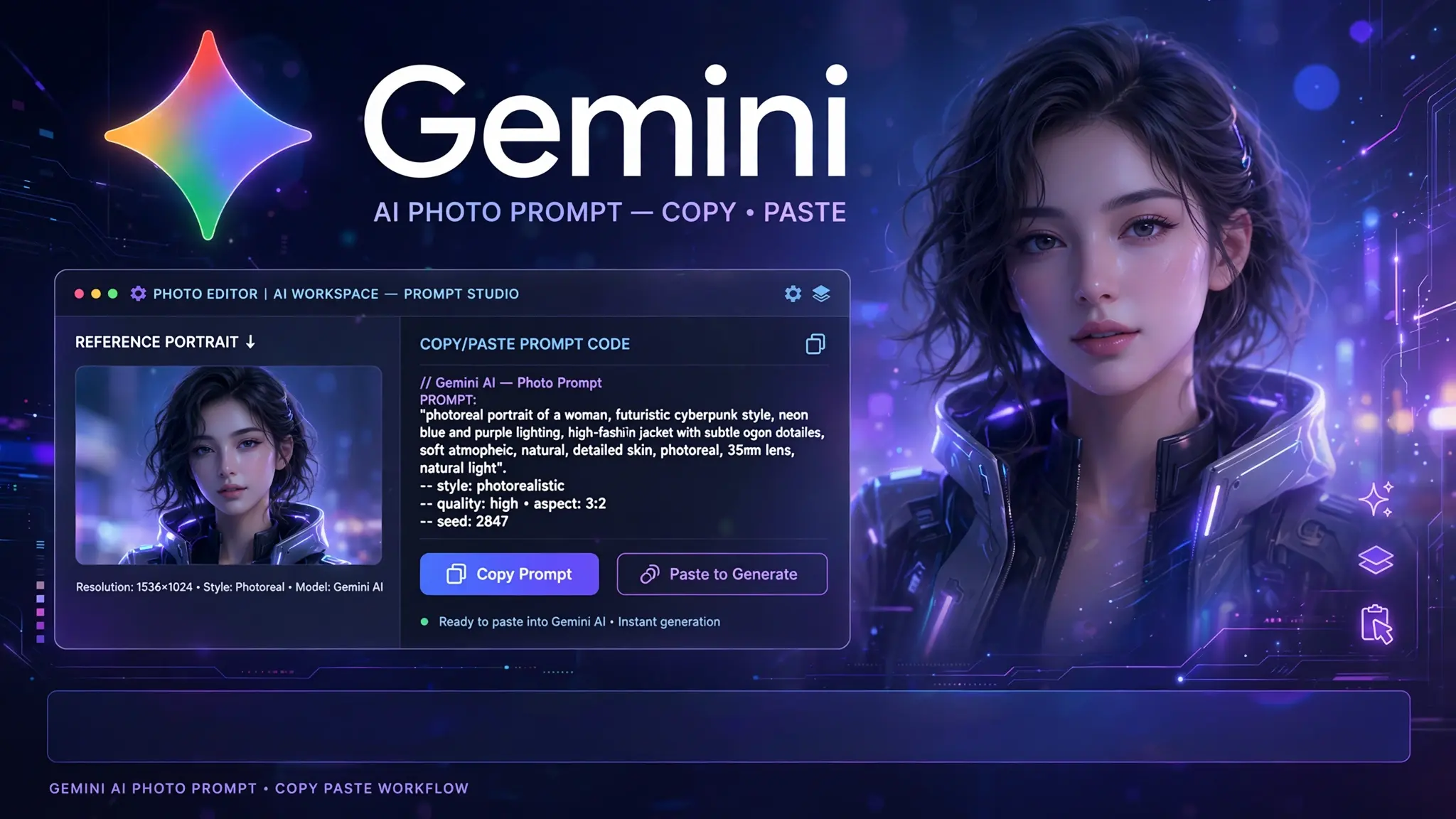
Gemini AI Photo Prompt Copy Paste: 8 Ready-to-Use Ideas
If you are hunting for a Gemini AI photo prompt copy paste collection that saves you time, this list was built for you. A plain snapshot can look far better with the right instructions behind it. The same picture that feels flat and forgettable can become a warm editorial portrait, a crisp product shot, or a nostalgic Polaroid, all without changing who is in it.
Below you will find 30 ready-to-use ideas covering couples, groups, birthdays, holidays, Polaroids, restoration, and products. Every one of them is designed to work with Gemini, so you can paste, attach your picture, and see a result quickly. You do not need design skills or long technical wording. You only need to know what to protect, what to change, and how to ask clearly.
TL;DR
Start every request by telling Gemini what it must not change. That means the face, skin tone, hair, body shape, and any product details such as logos, labels, and colors. Once those are locked, describe the makeover: the setting, clothing, lighting, and framing. Keep the order simple. Protect first, transform second. This one habit prevents most of the odd results people complain about, like faces that drift, extra fingers, or a product that suddenly looks different.
Do not expect perfection on the first try, and do not panic if it is close but not quite right. When a result is nearly there, ask for one small fix in the same chat, such as softer light or a less busy background, instead of regenerating from scratch. Small follow-up edits keep everything you already like and change only the piece that bothers you. Save the wording that works, tweak one detail at a time, and you will build your own reliable library in no time.
What Is an Image Prompt, Exactly?
A prompt is a short creative brief. Think of it as the note you would hand a photographer or retoucher before they start work. It tells the tool what you want, what should stay the same, and what mood you are after. The clearer the note, the closer the result.
There are two main situations. The first is text-to-image, where you describe a scene from scratch and the model creates it. For example, you might ask for a candid portrait of someone laughing on a sunlit balcony. Nothing exists yet, so the model has full creative freedom.
The second is image-to-image, where you upload your own picture and ask for a change. Here the stakes are higher, because the model must respect a real person or a real product. For example, you might upload a casual selfie and ask for a polished studio look while keeping the same face.
This is where separating protected details from details to change becomes essential. Protected details are the things that make the subject recognizable: face shape, skin tone, hair, expression, and product labels. Details to change are the setting, outfit, lighting, and style. When you blend the two into one messy sentence, the model may guess, and that is how accidental face swaps and altered products happen. Naming what stays first, then what changes, gives the model a clean boundary to work inside.
How to Use the Prompts on Gemini
- Open Gemini and start a new chat. Open Gemini on the web or in its mobile app. Begin a fresh conversation so earlier messages do not influence the new result.
- Start an image request. Tell Gemini you want to create or edit an image. In many cases you can simply describe what you want in the message box.
- Attach your photo. For edits, attach your picture to the chat and wait until it finishes uploading. If you are creating a scene from scratch, skip this step.
- Paste the prompt and send. Paste your chosen prompt into the message box, swap in your own details, and send it. Look closely at the faces, hands, and background before you judge the result.
- Ask for changes in the same chat. If something is off, reply with a short, specific request. Gemini keeps the context of the conversation, so you can usually fix a detail without uploading the picture again.
Tip 1: Choose a clear source photo. A sharp, well-lit picture where the face is easy to see gives the model far more to work with than a blurry or dark one.
Tip 2: Follow up with small edits inside Gemini instead of starting over. Asking for one change at a time, like a calmer background, keeps the parts you already like.
Best Gemini AI Photo Prompt Copy Paste
These eight examples cover the situations people ask about most. Each one comes with a short note on who it suits and how to adjust it.
1. Soft Window-Light Editorial Portrait
This is the go-to choice for a casual selfie or profile picture that feels flat. It suits creators, bloggers, and anyone who wants a magazine-style look. The tricky part is keeping skin texture natural while adding soft, directional light, so the face still looks like you rather than a filtered copy.
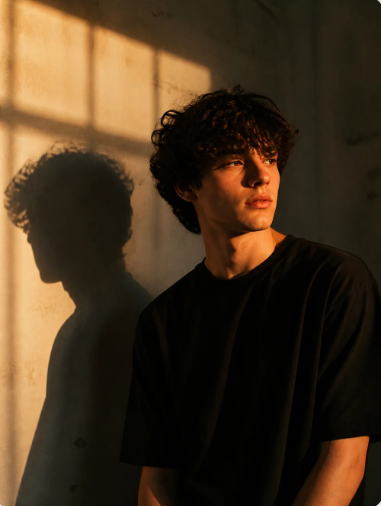
[Ultra-realistic cinematic portrait of me standing beside a wall during golden hour sunset light, same pose as the reference image, body slightly turned sideways while face looks away from the camera with a calm moody expression. Messy medium-length curly hair with soft natural texture, wearing an oversized plain black t-shirt. Strong warm sunlight enters from a window creating dramatic rectangular light patterns and deep shadows across the wall and face. Sharp dark shadow silhouette cast on the wall beside me. Moody cinematic atmosphere, high contrast lighting, warm amber and orange tones mixed with deep shadows, soft film grain, realistic skin texture, editorial photography style, shallow depth of field, natural imperfections on wall, no change on face, artistic composition, emotional indie aesthetic, ultra detailed, realistic iPhone photo quality, 50mm lens, soft glow, dark background, cinematic color grading, authentic shadow direction, realistic curls movement, photorealistic, 8k, it should looks like real photograph. Negative Prompt: low quality, blurry face, extra fingers, bad anatomy, distorted face, overexposed light, flat lighting, smooth plastic skin, anime, cartoon, CGI, unrealistic hair, duplicate shadow, messy background, different pose, smiling expression, bright colorful clothes, sharp HDR overload, bad proportions, deformed body, low resolution, noisy image, fake AI look, washed colors, soft focus, incorrect shadow angle, extra limbs, tilted eyes, watermark, text, logo, cropped head, oversaturated skin, stiff pose, unrealistic curls, motion blur, background clutter, face change, over bright, over glow. ]
2. Romantic Couple Portrait at Golden Hour
Couple portraits are harder than solo shots because two faces must survive the edit. This one suits anniversaries, engagement announcements, and social posts. The risk is that Gemini blends features or changes one person more than the other, so both people need equal protection from the very first line.
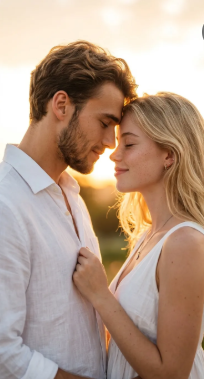
[Use the uploaded man and woman as the ONLY identity references. Preserve 100% exact facial identity, face shape, hairstyle, skin tone, eyes, nose, lips, and natural expressions. No beautification or facial alterations.Create an ultra-realistic romantic couple portrait during golden hour.The couple stands extremely close, forehead-to-forehead, eyes closed, sharing a quiet intimate moment. The woman gently holds the man’s shirt near his chest while smiling softly. The man slightly lowers his head toward her with a calm, affectionate expression.Wardrobe:Woman: white sleeveless summer dress, delicate necklace and earrings.
Man: white linen shirt with top buttons open.
Lighting:
Strong natural backlight from the setting sun positioned behind the couple. Soft glowing rim light around hair and facial edges. Warm sunlight creates subtle lens flare and dreamy highlights while maintaining realistic skin texture and facial detail.
Style:
Luxury editorial photography, cinematic romance, fine-art portrait, timeless couple photography.
Composition:
Vertical portrait, medium close-up framing, centered subjects, shallow depth of field, soft blurred background, intimate storytelling.
Background:
Bright sky with warm sunset glow, minimal distractions, soft bokeh, airy atmosphere.
Mood:
Romantic, emotional, peaceful, authentic, elegant, deeply connected.
Photography:
85mm lens, f/1.8, natural skin texture, visible hair strands, realistic fabric details, premium DSLR quality.
Quality:
Ultra-realistic, photorealistic, luxury magazine quality, 8K, high detail, cinematic color grading.
Aspect Ratio: 9:16.
Negative Prompt:
face distortion, beauty filters, plastic skin, CGI, cartoon, over-retouching, identity changes, blurry faces, bad anatomy, extra limbs, watermark, text]
3. Birthday Polaroid Keepsake
A birthday snapshot can become a nostalgic Polaroid with a white border, soft flash, and a slightly faded color palette. It suits party memories, invitations, and scrapbook pages. The tricky part is adding the vintage feel without blurring faces or turning the whole scene brown.
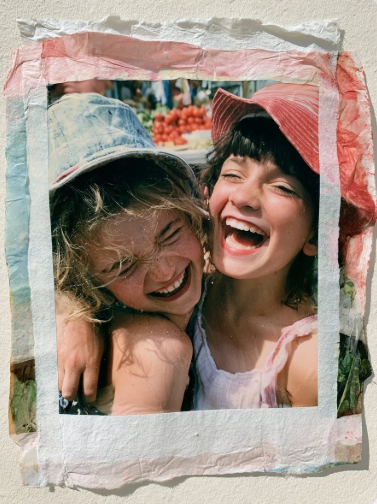
[Polaroid emulsion lift, the image floated off its backing and settled onto handmade cotton paper, gentle ripples and folds from the transfer process, colors softened into translucent pastel layers, edges drifting organically beyond the original frame, a unique photographic artifact shaped by hand.]
4. Group Photo Makeover with Everyone Protected
Group shots fail when the model treats the crowd as one blob. This use case suits family gatherings, team outings, and friend reunions. The hard part is keeping every face, height, and pose intact while you change the setting or lighting around them. Start with two to five people if you are new to this.
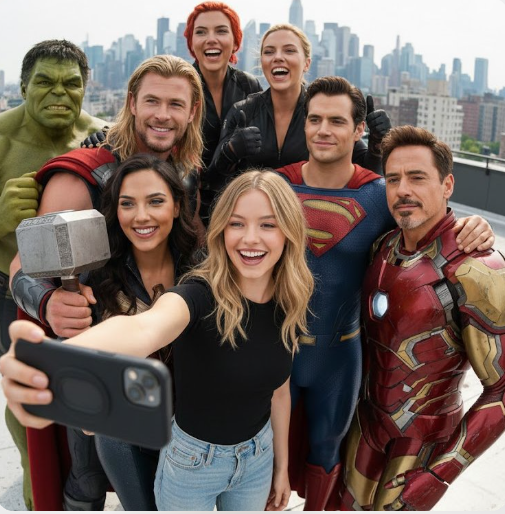
[A ultra realistic group selfie, center is the person from the attached image, wearing a fitted black shirt and ripped jeans, holding an iPhone for the selfie. Around are Chris Hemsworth as Thor, Gal Gadot as Wonder Woman, Scarlett Johansson as Black Widow, Mark Ruffalo as Hulk, Henry Cavill as Superman, RDJ in full armor all hugging, smiling, posing casually like close friends. Fun, joyful mood, bright daylight, cinematic quality, natural look, high detail.]
5. Cozy Holiday Portrait
Holiday pictures are often taken in cluttered rooms with harsh overhead light. This idea suits family cards, greetings, and seasonal posts. The tricky part is adding festive warmth, such as string lights and knit textures, without hiding the people or making the scene look staged.
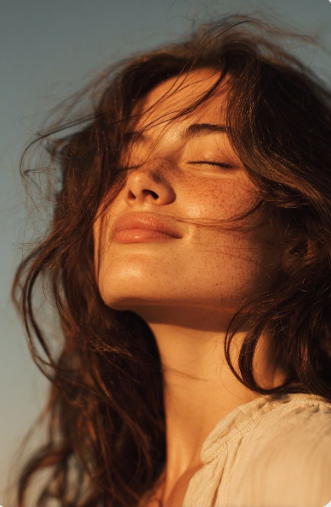
[Ultra-realistic golden hour close-up portrait of a young woman outdoors, eyes gently closed with a soft peaceful smile, face tilted slightly upward toward the warm setting sun, loose windblown dark brown hair flowing naturally across her face, glowing sun-kissed skin with natural texture and subtle freckles, minimal makeup, soft glossy lips, wearing a loose white linen blouse with a delicate collar, cinematic warm amber sunlight creating beautiful highlights and gentle shadows, shallow depth of field, clean blue sky background, dreamy summer atmosphere, authentic candid expression, ultra-detailed skin texture, high dynamic range, 85mm portrait lens, f/1.8, professional fashion photography, natural color grading, soft contrast, editorial lifestyle aesthetic, photorealistic, 8K, RAW quality.]
6. Professional Headshot Refresh
A polished headshot helps with resumes, team pages, and business profiles. It suits job seekers, freelancers, and small business owners who want a clean, trustworthy look. The tricky part is improving lighting and background without altering your face, age, or features in a way that feels dishonest.

[Ultra realistic professional business portrait based on the attached image. Keep the subject’s facial structure, skin tone, hairstyle, and expression accurate. Dress the subject in clean, modern professional attire suitable for executives. Use a soft, minimal, premium gradient background with smooth lighting transitions]
7. Travel Portrait in a New Location
Swap a plain backdrop for a place you dream about visiting, whether it is a coastal village or a mountain trail. This suits social posts, travel blogs, and vacation mock-ups. The tricky part is matching the light on your face to the new setting so it does not look pasted in.
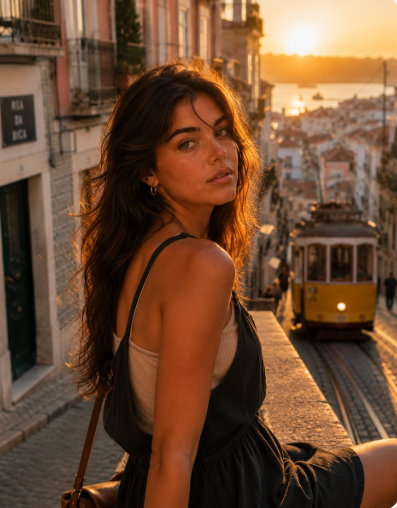
[Photorealistic cinematic portrait of a young Portuguese woman strolling through a charming Lisbon street at sunset, golden evening light wrapping softly around her silhouette and illuminating loose chestnut-brown hair as it catches the breeze. She has sun-kissed Mediterranean features, effortless natural beauty, and wears a light beige ribbed top beneath a dark linen overall dress with delicate shoulder straps. Her gaze meets the camera with a warm, thoughtful expression, conveying quiet confidence and authenticity. Rich amber sunlight, subtle coastal glow, soft lens flare, blurred city lights and pastel-colored architecture in the background, relaxed summer ambiance, editorial travel-photography aesthetic, realistic skin texture, fine film grain, intimate storytelling mood, naturally composed candid moment, shallow depth of field, premium magazine-quality realism –ar 4:5 –raw –stylize 80 –weird 5 –hd –preview]
8. Product Campaign Image
Sellers need images that look clean and consistent. This suits small shops, marketplace listings, and social ads. The hard part is protecting real product details, like logos, text, colors, and shape, because a buyer who receives something different from the picture will be unhappy.
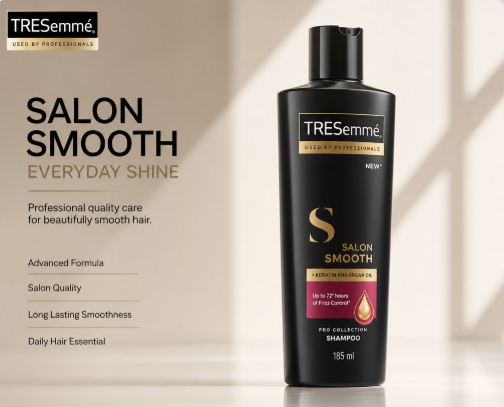
[Create a premium 4:5 FMCG hero advertisement from the uploaded product image. Preserve the product exactly—no changes to shape, packaging, branding, logo, colors, labels, proportions, materials, or textures. Automatically extract the original brand logo from the packaging and place it cleanly in the top-left. Generate a premium headline, a 1–2 line subheading, and four text-only product features on the left. Display the product as the main hero (≈70% of the layout) with realistic contact shadows, soft reflections, and luxury composition. Add a bottom strip with 4–5 consistent product angles (front, 45°, side, back, top/close-up). Use an Apple-inspired minimal studio with a soft gradient background derived from the product’s brand colors, natural window light, HDR global illumination, subtle reflections, and elegant negative space. Swiss typography (SF Pro Display/Helvetica Neue/Inter style). Shot on ARRI Alexa Mini LF with an 85mm product lens. Ultra-photorealistic V-Ray/Octane/Unreal Engine 5 quality, ray tracing, 8K, magazine, catalog, billboard, Amazon listing, and luxury brand campaign standard. No humans, icons, decorative graphics, clutter, or redesigned packaging. Product remains the absolute hero.]
How to Write Your Own Prompt
Once you understand the pattern, you can build your own in minutes. Use this five-part framework: Source, Lock, Transform, Scene, Finish.
- Source. Fill-in line: Use the attached picture of ______. This line tells Gemini what it is starting from. For example, fill the blank with “a couple on a city street” or “a candle on a wooden table.”
- Lock. Fill-in line: Keep ______ exactly the same. List every detail that must not change. For example, the face, skin tone, hair, and the label on a bottle.
- Transform. Fill-in line: Change ______ into ______. State the main makeover in plain words. For example, turn a plain hoodie into a tailored navy blazer.
- Scene. Fill-in line: Place the subject in ______ with ______ light. Describe the setting and the light together, since they affect each other. For example, a quiet café with soft window light.
- Finish. Fill-in line: Make it look like _____, with ______. Choose one style and a few final touches. For example, a natural film look with gentle grain and no heavy retouching.
Lock matters most because it is the only step that protects what you cannot replace. A wrong outfit or background is easy to fix in a follow-up, but a face that has drifted from the original often means starting over. Locking also helps when you edit groups or products, where several details must survive at once. If you only have time to write one strong line, write this one. Be specific, list each detail by name, and repeat the most important one if it keeps changing.
How to Get Better Results
- Start with a clear source photo. Choose a sharp, well-lit picture where faces are fully visible. Tiny, blurry, or heavily filtered files give the model less to work with.
- Name what must stay. Write the protected details before anything else. Face, hair, skin tone, and product text should be listed by name, not left for the model to assume.
- Use “change only.” A phrase like “change only the background” gives the model a narrow job. This cuts down on surprise edits to clothing, poses, or expressions you wanted to keep.
- Describe the light specifically. Words like soft, warm, overcast, or backlit are far more useful than “nice lighting.” Say where the light comes from, such as a window on the left, so shadows stay believable.
- Choose one visual style. Mixing film grain, cartoon, and cinematic looks in one request usually leads to a muddy result. Pick a single direction and add a second only in a follow-up.
- Protect every person in a group. State that each person keeps their own face, expression, and position. If one face changes, ask for a fix to that person alone instead of redoing everything.
- Upscale at the end. Finish the creative edits first, then ask for a sharper, larger version or use an upscaling tool if you have one. Working in this order keeps you from polishing details you might still change.
A quick word on the over-polished look. Overly smooth skin, glowing edges, and perfect symmetry are giveaways that a picture has been heavily processed. To avoid this, ask for natural skin texture, gentle imperfections, and realistic shadows. Small flaws like a stray hair or a soft shadow make an image feel real. If the first result looks plastic, do not start over. Ask for less smoothing and more natural detail, then compare again.
Gemini vs. Other AI Image Models
No single model wins every task. Some are better at keeping faces steady, others at style or readable text. Here is a quick, general comparison of three options so you can choose the right tool for each job.
| Model | Best for | Watch out for |
| Gemini | Everyday edits of your own pictures, quick conversational changes, and follow-up fixes that keep the original subject recognizable. | Long, crowded instructions can cause drift, so keep each request focused and fix details one small step at a time. |
| ChatGPT Image | Detailed conversational instructions, clear illustration styles, and images that include readable text or labels. | Likeness may change across edits, so check faces closely and repeat your lock instructions when needed. |
| Grok | Creative, stylized, and playful images, especially when you want a bold or imaginative look rather than strict realism. | Realistic edits of real people can vary, so test with one simple request before relying on it. |
If one detail keeps failing, resist the urge to make your prompt longer. Long prompts often add confusion, and the model may start ignoring parts of them. Instead, copy the same prompt into another model and compare.
A different model may handle that one detail, such as text on a label or a difficult pose, far better. Keep the wording identical so the test is fair. Once you find the better fit, stay with it for that job. It is normal to use different tools for different tasks, and that flexibility saves time and frustration.
FAQs
What is the best prompt for editing a photo with Gemini?
The best prompt is one that names what must stay the same before it describes what should change. If you are browsing any Gemini AI photo prompt copy paste list, look for entries that lock the face or product first, then add setting, clothing, light, and style. Prompts with a clear structure give more predictable results than long, poetic ones. Try a few from this article, then adjust one detail at a time until the result feels right.
How do I keep the same face in the result?
Start by naming the face as a protected detail. Mention the face shape, skin tone, hair, and expression, and tell the model to keep them exactly the same. Then limit the change to the setting, outfit, or light. Use a sharp, front-facing source picture when possible. If the face still drifts, ask for a small correction in the same chat rather than regenerating, and avoid adding heavy style words that encourage the model to redraw features.
What is the difference between Gemini and Nano Banana?
Gemini is an AI assistant that can also create and edit images, and Nano Banana is the nickname used for that image ability. When you create or edit pictures inside Gemini, you are using that image feature. So you do not need a separate app for the ideas in this article. Names and features can change over time, so check what your version of Gemini currently offers before you start.
Can I edit my own photos with these prompts?
Yes. Most of the examples here are designed for your own pictures, which you attach to the chat before pasting the prompt. Use photos you own or have permission to edit, especially when other people appear in them. Swap in your own details, keep the lock step intact, and start with a clear, well-lit image. A few small follow-up edits usually finish the job.
Final Thoughts
A good Gemini AI photo prompt copy paste list should save you time, not add work, and now you have 30 ideas to start with. Remember the habit that matters most: lock what must stay, then describe the change.
Use small follow-up edits, keep your source picture clear, and try another model when one detail refuses to cooperate. Pick a favorite from the list today, try it on a picture you love, and see how far one clear instruction can go.