ChatGPT Photo Editing Prompts: 10 Powerful Ideas
chatgpt photo editing prompts can save hours of trial and error when an image looks close to right but still misses the mark. Many people struggle because their instructions are too vague, they describe the desired change but forget to protect important details, or they regenerate everything instead of refining what already works.
This guide explains how to approach image transformations more effectively, how to work with ChatGPT for image changes, and how to structure instructions that produce cleaner results. You will also find ten ready-to-fill examples, a reusable framework, troubleshooting advice, and comparison notes with Gemini and Grok.
Quick Takeaways
Successful image transformation usually comes down to clarity. Instead of describing only what you want to change, explain what must remain untouched. That single habit often prevents altered faces, shifted proportions, changed clothing details, or unwanted background modifications. The more important the original image is, the more valuable this approach becomes.
Another useful habit is making small corrections after a nearly successful result. If the image is 90% correct, avoid starting from scratch. Ask for one focused adjustment at a time. For example, improve lighting, adjust background mood, refine colors, or correct a specific object. Small follow-up requests often produce more reliable outcomes than generating a completely new version.
What a Good Prompt Actually Does
A strong instruction acts like a creative brief rather than a random request. It tells the model what to preserve, what to modify, and how the final result should feel. The goal is not to write as many words as possible. The goal is to communicate priorities clearly.
There are two common situations. The first is creating an image from text alone. In that case, you are describing everything from scratch. The second is transforming an existing image. In that workflow, the source image already contains valuable information that should not be lost.
A simple text-to-image example might be:
Quiet mountain cabin at sunrise with soft mist and warm light.
A simple image-transformation example might be:
Keep the person’s pose unchanged. Replace the background with a snowy forest.
Notice how the second example separates protected elements from changing elements. That distinction matters. When instructions blend everything together, the model may assume that every detail is open for modification.
Many disappointing results come from missing priorities. Someone requests dramatic lighting but forgets to mention that clothing must remain unchanged. Another person asks for a new environment but never specifies that facial features should stay accurate. The model then fills gaps with its own interpretation.
A good creative brief reduces those gaps. It communicates hierarchy. First protect important elements. Then describe the desired changes. Finally explain mood, atmosphere, color direction, and finishing details. This structure consistently produces cleaner outcomes and makes follow-up refinements much easier.
How to Use the Prompts on ChatGPT
1. Start a conversation with image capabilities
Open ChatGPT and begin a conversation where image generation or image transformation is available. If you are working from an existing image, have the file ready before writing your instructions.
2. Attach the source image when needed
For transformations, upload the image you want to modify. Make sure the subject is visible and important details are not hidden by motion blur, poor lighting, or heavy compression.
3. Paste your instructions
Enter your request clearly. Start with elements that must remain unchanged. After that, explain the desired visual changes, mood, environment, lighting, colors, and any special creative direction.
4. Review the first result carefully
Instead of deciding whether the image is perfect or useless, identify exactly what worked and what did not. Specific feedback produces stronger follow-up results than broad criticism.
5. Request targeted refinements
Ask for one correction at a time whenever possible. If the atmosphere is correct but the background feels distracting, focus only on the background. If colors work but lighting feels flat, adjust only the lighting.
A final tip: begin with the clearest source image available. Sharp inputs usually preserve details more effectively. Also remember that a small follow-up adjustment often works better than restarting the entire process.
Best chatgpt photo editing prompts
The examples below focus on practical transformation scenarios. Replace each placeholder with your own finished instruction and customize the details for the image you want to improve.
1. Cinematic Evening Upgrade
Many images have good composition but ordinary lighting. This use case suits travel shots, lifestyle images, and everyday scenes that need stronger atmosphere without looking unrealistic. The challenge is enhancing mood while keeping the original subject recognizable and natural.
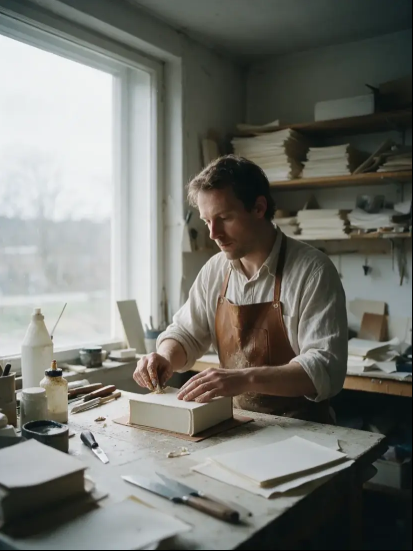
[Cinematic portrait by window light. A bookbinder at his bench beside a large north-facing window
that fills most of the wall to camera left, so the light is broad and soft, wraps around the near
side of his face and falls away gradually rather than stopping. No fill from the other side; the
right of his face sits about two stops down with detail intact. Cool even daylight with no direct
sun. Three-quarter view, working, not looking at camera. Palette of paper white, linen and warm
leather. Real skin, glue-stained fingers, fine grain, 3:4.]
2. vertical premium paint advertising poster
ultra-photorealistic

[4:5 vertical premium paint advertising poster
ultra-photorealistic luxury interior photography
Asian Paints flagship brand campaign
high-conversion home décor marketing creative
award-winning advertising design
social-first premium campaign
Behance front-page quality
8K ultra-detail
architectural digest aesthetic
luxury Indian lifestyle advertising]
3. A young woman with shoulder-length dark brown wavy hair sitting cross-legged
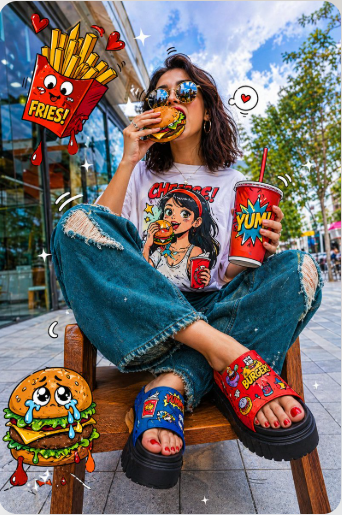
[A young woman with shoulder-length dark brown wavy hair sitting cross-legged
on a wooden bench/stool, eating a cartoon-style burger with her right hand
raised to her mouth. She wears round gold-framed reflective sunglasses, a
white oversized graphic t-shirt featuring a cartoon illustration print on the
chest, baggy distressed teal/denim wide-leg pants with ripped knees, and
chunky platform sandals — left foot in blue and red sandal, right foot in
red sandal with visible red-painted toenails. She holds a red cartoon soda
cup with a red straw in her left hand. Surrounding her are floating
comic-style fast food elements: an animated crying cheeseburger bottom-left,
a cartoon french fries box top-left dripping red sauce with hearts, and a
cartoon soda cup. The background is a real photographic urban outdoor setting
with glass storefront, trees, cloudy blue sky, and tiled floor. The art style
blends realistic photography with vibrant 2D cartoon/comic illustration
overlays on the food items and clothing. Small white sparkle/star doodles
scattered across the frame. Bright, high saturation colors, fun and playful
pop-art street style mood.]
4. Model looking at camera, close up of face
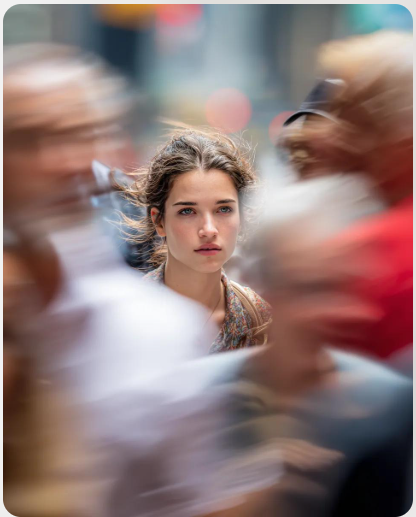
[Model looking at camera, close up of face, busy New York street, motion blurred people crossing frame, 200mm zoom lens]
5. A young, energetic girl with a short bob haircut
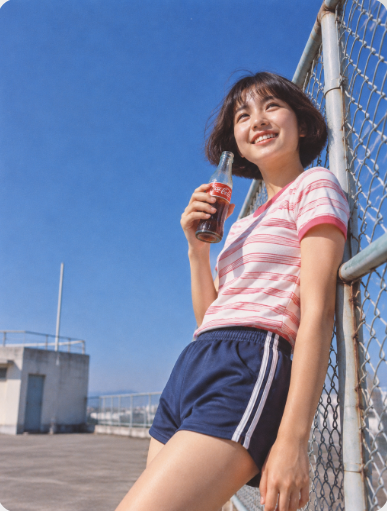
[Japanese retro high school photography on vintage Kodachrome film. A young, energetic girl with a short bob haircut wears a pink-and-white striped athletic T-shirt and holds an ice-cold vintage glass soda bottle beaded with condensation as she leans against an open chain-link fence on an empty rooftop. Minimalist low-angle composition, with generous clean negative space beneath a vast, pure cobalt-blue sky. Cobalt blue, strawberry pink, and warm skin tones; bright diffused daylight, gentle low contrast, and natural film grain.]
6. A hyper-realistic 8k photograph captures a surreal outdoor scene
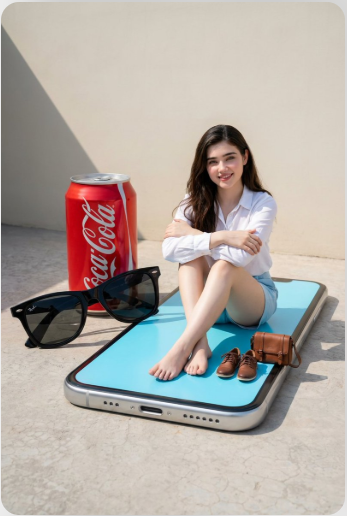
[A hyper-realistic 8k photograph captures a surreal outdoor scene with precise “Photoshop logic” and cinematic lighting. A normal-sized woman, uploaded face as reference, wearing a crisp white long-sleeved button-up shirt and light blue shorts, sits cross-legged with arms crossed and a pleasant smile, positioned centrally on the vibrant light blue display screen of a gigantic silver iPhone. Her bare feet are visible, resting on the screen.Adjacent to the left side of the colossal smartphone, on the textured light grey concrete ground, are a giant classic red Coca-Cola can and a pair of giant black Wayfarer-style sunglasses, with one arm of the sunglasses slightly overlapping the phone’s bezel.On the giant phone’s screen, to the right of the woman’s legs, are two miniature items: a pair of highly detailed brown lace-up shoes and a small brown leather messenger bag with a flap and buckle.The background consists of a plain, smooth, light beige wall, across which a sharp, prominent diagonal shadow is cast from the upper left, creating a dramatic contrast. The image is captured with a medium shot, from a slightly low angle, under harsh natural daylight, producing crisp, defined shadows and highlighting the highly detailed textures of all surfaces.]
7. Cinematic lifestyle shot on a city street
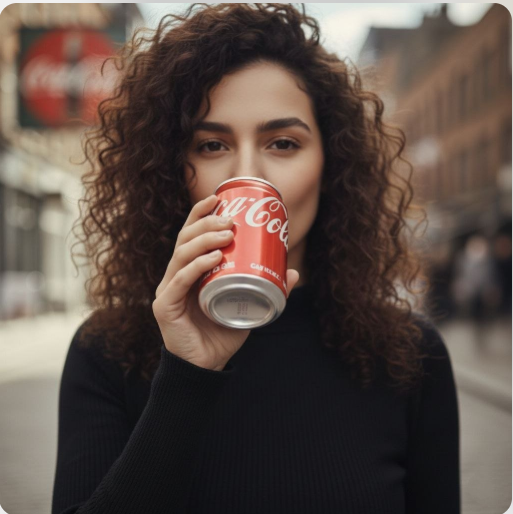
[Cinematic lifestyle shot on a city street with soft background blur. A stylish woman with natural curly hair, wearing a black turtleneck, holds a red soda can near her lips. She takes a confident sip, lowers the can slightly, smiles subtly, and looks directly into the camera. With a calm, stylish tone, she says: “Thunder in a drink — cheers.”
Natural daylight, shallow depth of field, smooth handheld camera movement, realistic facial expressions, soft cinematic lighting, premium beverage commercial aesthetic. Clean audio, natural lip sync, subtle wind movement in hair, realistic hand motion. Shot in ultra-realistic quality, 4K, 24fps, cinematic color grading, modern urban vibe, 1:1 aspect ratio.]
8. Architectural Mood Upgrade
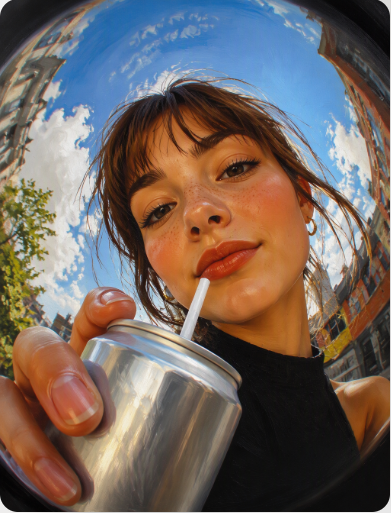
Painterly editorial portrait, realistic digital painting with visible brush texture, soft blended skin tones, cinematic lighting, extreme fisheye lens (ultra wide angle 10–14mm), strong perspective distortion, close-up face filling the frame, character drinking from a silver can with a straw, hand and drink enlarged and distorted toward the camera, dynamic composition, vibrant contrasting colors, sharp focus on face, background slightly blurred, playful and expressive mood, the drink is generic and unbranded, with, with no recognizable logo or brand on it. Extreme close-up fisheye perspective, low angle, strong lens distortion, foreground objects enlarged, face centered, dynamic warped background, immersive and playful composition. Remake @img1 but she has the mouth closed, she is wearing small hoop earings, and holding a silver can with a white straw.
9.modern simple illustration
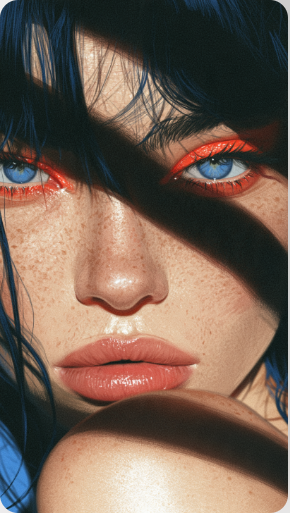
modern simple illustration inspired by impressive portrait with strobe flash, strong film grain.
10.Ultra-detailed semi-realistic digital illustration
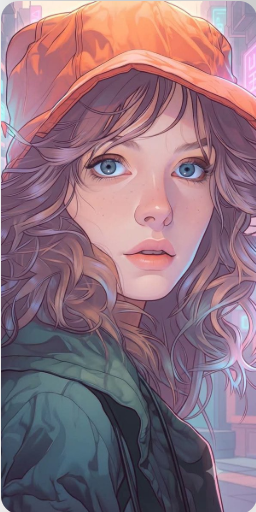
Ultra-detailed semi-realistic digital illustration, modern graphic novel aesthetic, painterly vector rendering, clean and precise linework, smooth cel-shading blended with soft airbrushed gradients, vibrant pastel color palette, cinematic color grading, warm sunset glow mixed with cool lavender and cyan reflections, subtle neon-inspired ambient lighting, stylized yet realistic facial anatomy, high-detail eyes and skin planes, soft geometric shadow transitions, polished digital painting texture, elegant edge highlights, atmospheric depth, shallow depth of field, contemporary urban illustration style, crisp contours, rich color harmony, soft bloom lighting, premium editorial artwork quality, highly refined character-focused composition, expressive lighting with balanced warm and cool tones, smooth color blocking, sophisticated visual storytelling, AAA game concept art meets modern animated series aesthetic, ultra-clean rendering, colorful and luminous mood, professional illustration finish, 4K quality.
Better Results Every Time
- Prioritize important details.
Place critical instructions near the beginning. If something absolutely must remain unchanged, state it before describing atmosphere or style. - Avoid conflicting directions.
An image cannot realistically be both dark and brightly illuminated in the same area. Resolve contradictions before generating results. - Describe purpose, not just appearance.
When the model understands the intended mood or use case, outputs often feel more coherent and intentional. - Refine one variable at a time.
If lighting is wrong, fix lighting first. Changing ten things simultaneously makes it difficult to understand what improved. - Use realistic expectations.
Major transformations can require several iterations. Expect gradual improvement rather than perfection on the first attempt. - Preserve visual consistency.
When changing one environmental element, make related elements match. Weather, lighting, shadows, and color temperature should work together. - Review at full size.
Small artifacts may be invisible in previews. A closer inspection often reveals details that need minor refinement.
One final consideration is avoiding an overly polished appearance. Images that look too perfect can feel artificial and generic. Real environments contain subtle imperfections, texture variation, and natural inconsistencies. Preserving some of those qualities often creates stronger and more believable results than chasing flawless perfection.
ChatGPT vs. Other AI Image Models
Different models have different strengths. Rather than searching for a single winner, it is more useful to understand where each one tends to perform well.
| Model | Best for | Watch out for |
| ChatGPT | Strong conversational refinement workflow for iterative image transformation requests | Overloading instructions may reduce clarity during complex multi-change requests |
| Gemini | Useful for structured creative directions and organized visual modification workflows | Very broad instructions may need additional clarification for consistency |
| Grok | Helpful when experimenting with unusual concepts and imaginative visual directions | Creative interpretation can occasionally exceed the intended level of change |
If one stubborn detail keeps failing, switching models is often smarter than adding more and more text. Many users respond to a difficult result by dramatically increasing instruction length. That approach can introduce confusion rather than clarity. Instead, try the same concise request in another model. Different systems sometimes interpret priorities differently. A result that struggles in one environment may work surprisingly well elsewhere without major rewriting. Think of model selection as another creative tool rather than a final judgment about quality.
Common Mistakes That Cause Weak Results
One common mistake is describing the desired outcome without describing the starting point. The model then has to guess which elements matter most. A brief protection statement often solves this problem immediately.
Another mistake is combining several unrelated goals into one request. Someone may ask for a new environment, dramatic weather, different lighting, stronger colors, and additional objects simultaneously. When too many changes compete for attention, consistency often suffers.
Vagueness is another frequent issue. Terms such as “make it better” or “make it cooler” leave too much room for interpretation. More specific direction creates more predictable results.
Many users also abandon a nearly successful image too early. If the result is mostly correct, continue refining it. Small adjustments can produce substantial improvements while preserving everything that already works.
Finally, avoid copying visual ideas blindly. Consider the purpose of the image first. A dramatic effect that works for a travel scene may feel inappropriate for a product presentation. Matching the visual treatment to the intended audience usually leads to stronger outcomes.
FAQs
What is the best prompt for image transformation with ChatGPT?
There is no single best instruction because goals vary. The strongest approach is usually one that clearly protects important details before describing desired changes. When using chatgpt photo editing prompts, focus on preservation first, transformation second, and finishing details last. That structure consistently improves clarity and reduces unexpected alterations.
How can I keep a subject accurate while changing the environment?
Start by identifying the subject as a protected element. Mention facial features, clothing details, pose, proportions, and any other characteristics that should remain intact. After that, describe environmental changes separately. This separation helps reduce accidental modifications and makes the overall request easier to interpret.
Can I use my own images as a starting point?
Yes. In many workflows, using your own image provides more control because the composition, subject, and key details already exist. The quality of the source image matters. Clear, well-lit images generally preserve important details more effectively than heavily compressed or blurry files.
When should I switch to another model?
Consider switching when a specific detail repeatedly fails despite several reasonable refinements. Sometimes a different model interprets the same request more effectively. Before rewriting everything, test the existing instruction elsewhere. A new interpretation may solve the issue without increasing complexity.
Final Thoughts
If you want more reliable results, focus on clarity, protected details, and small refinements instead of endless regeneration. The strongest chatgpt photo editing prompts usually communicate priorities clearly and separate unchanged elements from desired transformations. Combine that approach with the framework in this guide, and you will spend less time correcting mistakes and more time improving images efficiently.