Gemini Couple Photo Prompt: 8 Ideas to Copy and Paste
You have a great photo of the two of you, but the background is dull, the light is flat, or the mood is just not there. A good gemini couple photo prompt can fix that in seconds. You upload your picture, paste a clear instruction, and Gemini reshapes the scene into something that feels like a proper photoshoot.
In this guide, you will learn how a gemini couple photo prompt works, how to upload your photo the right way, and which mistakes quietly ruin results. You will also find 12 featured prompt themes covering different moods, settings and styles, so you never run out of ideas.
What Is a Gemini Couple Photo Prompt and Why Does It Work?
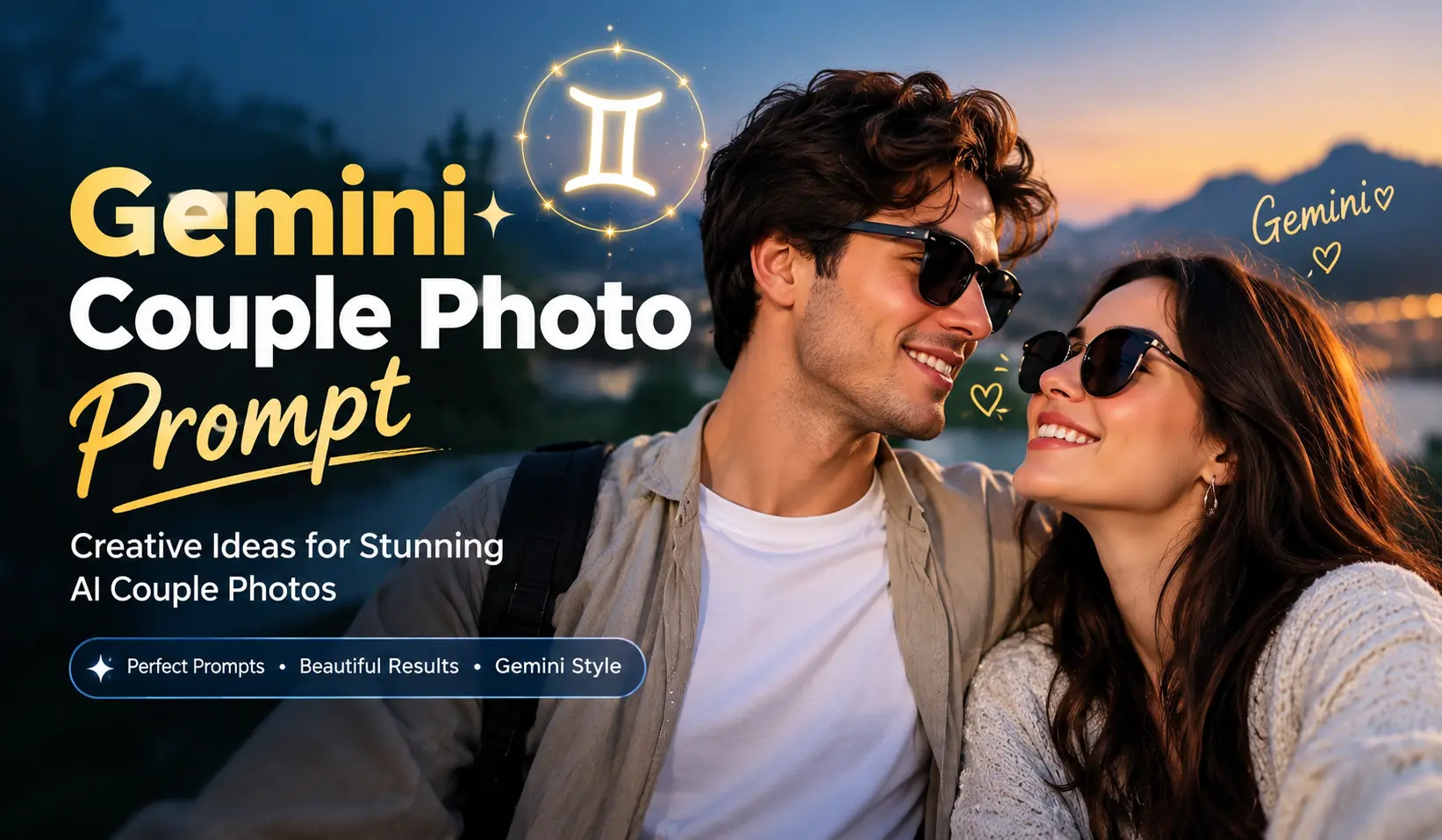
A gemini couple photo prompt is a short written instruction you give to Google’s Gemini, along with a photo of two people, to change how that photo looks. The instruction might change the background, the lighting, the outfits, the colour style or the whole mood of the picture. Think of it as telling a photographer exactly what you want, except the photographer is an AI tool that responds in seconds.
It works because Gemini can read both your image and your words at the same time. When you describe the scene clearly, the tool has a much better target to aim for. A vague request like “make it romantic” leaves too much to chance. A detailed request that mentions the setting, the light, the clothing and the feeling gives Gemini something solid to follow.
Couple photos are also a natural match for this kind of editing. Most couples have plenty of casual pictures taken on phones, in living rooms, at family events or on ordinary streets. Those photos hold real emotion, but the surroundings are rarely special. A well written prompt keeps the people and upgrades everything around them.
Here is why so many people like this approach:
- It is fast. You can test several looks in a single sitting.
- It is affordable. There is no studio rent, no travel and no photographer fee.
- It is flexible. You can try a beach sunset, a snowy cabin and a vintage film look from the same starting photo.
- It is creative. You can imagine places and styles you could never visit for a real shoot.
- It is beginner friendly. You do not need editing software or design skills.
People use couple photo prompts for anniversary posts, wedding invitation ideas, social media profile pictures, gifts for a partner and pre-wedding style inspiration. Whatever your reason, the quality of the result depends mostly on the quality of your instructions. That is exactly why a well structured Gemini couple photo prompt matters so much.
One honest note before we go further: AI results are never identical twice. Even with the same instructions, you may see small differences in faces, hands, clothing details or background elements. Treat every result as a draft, and expect to refine it once or twice.
Common Ways Couples Use a Gemini Couple Photo Prompt
The most popular use is the anniversary post. Couples take a favourite photo from the year and use a gemini couple photo prompt to place themselves in a dream location, a vintage setting or a festive evening. It gives an old memory a fresh, shareable look.
Another common use is wedding and engagement planning. Many people try a gemini couple photo prompt to explore colour palettes, outfit styles and venue moods before they commit to real choices. Seeing a rough idea on screen can make conversations with a photographer or decorator much easier.
Long-distance couples also enjoy this type of editing. Two people who live in different cities can use a shared photo and a creative prompt to imagine a day together in one place. Finally, many people simply want a better profile picture or a thoughtful gift, such as a framed print or a digital card for a partner or parents.
What a Strong Gemini Couple Photo Prompt Usually Includes
Most successful instructions share the same building blocks. You do not need all of them every time, but the more you cover, the more control you have.
- Subject: Say that it is a couple and mention if you want them to keep the same pose.
- Setting: Name the place and one or two background details.
- Lighting: Describe the time of day and the softness or warmth of the light.
- Outfit: Keep the current clothes or describe the new ones.
- Mood: Use words like romantic, joyful, calm, nostalgic or cinematic.
- Style: Mention whether you want a realistic photo, a film look or a soft editorial feel.
- Format: Mention portrait or landscape framing if it matters.
Keep these seven points in mind and your next gemini couple photo prompt will almost write itself.
How to Use a Gemini Couple Photo Prompt Step by Step
Using a Gemini couple photo prompt is simple once you know the flow. Follow these steps and you will get cleaner results from the very first try.
Step 1: Open Gemini and Start a New Chat
Open the Gemini app or website and sign in with your Google account. Start a fresh chat so older instructions do not confuse the new edit. A clean chat also makes it easier to compare results later.
Step 2: Choose a Strong Starting Photo
Your original photo sets the ceiling for the final result. Pick a picture where both faces are clearly visible, the lighting is decent and the pose looks natural. A sharp, well lit photo almost always beats a blurry one, even if the blurry one has more sentimental value.
Step 3: Upload the Photo
Tap the upload or plus icon inside the chat box and attach your picture. Wait until the image fully appears before you type anything. If you are using a phone, make sure the photo is not a tiny compressed copy from a messaging app, because the lost detail can hurt the final output.
Step 4: Paste Your Prompt and Customise It
Paste your chosen prompt into the message box and adjust the details to match your photo. Change the outfit colours, the location, the time of day or the mood so the instruction fits your couple. This small customisation step is what separates a generic result from one that feels personal.
Step 5: Send and Review the Result
Send the message and look at the result carefully. Zoom in on faces, hands, clothing edges and background objects. Ask yourself whether the couple still looks like you and your partner, and whether the scene matches the mood you wanted.
Step 6: Refine With Follow-Up Messages
If something is off, do not start over. Reply in the same chat with one clear correction, such as “keep the same scene but make the lighting softer” or “make the background less crowded.” Short follow-ups usually work better than rewriting the entire instruction.
Step 7: Save Your Favourite Version
When you like a result, download it right away and note which instruction produced it. Keep the original photo as well, so you can try a different theme later without searching your gallery again.
How to Customise Any Gemini Couple Photo Prompt
Customising is where the real magic happens, so it deserves its own mini routine. When you pick a gemini couple photo prompt from a list, read it once and underline the parts that describe place, light, outfit and mood. These are the four parts you can swap without breaking the instruction.
Next, compare those parts with your original photo. If you are standing in daylight, a night scene will fight with the existing light, so choose a sunrise, golden hour or overcast theme instead. If one of you is wearing dark clothes and the prompt describes pale outfits, decide whether you want to change the clothes or keep them.
Finally, add one personal detail. It could be a favourite colour, a shared hobby or a place that means something to you both. A single detail like this turns a copied gemini couple photo prompt into your own creative idea, and it usually makes the result feel warmer and more believable.
Tips for Uploading Your Photo
The upload step deserves extra attention, because a poor input causes most disappointing results. Keep these points in mind:
- Use a photo where both faces are clearly visible and not covered by hair, hands or heavy shadows.
- Choose natural, even lighting instead of harsh flash or very dark rooms.
- Avoid photos with heavy beauty filters, because they can confuse facial details.
- Pick a framing that matches your goal. If you want a full body wedding scene, start with a photo that shows more than just faces.
- Avoid very crowded backgrounds, since other people may get mixed into the edit.
- Use the highest resolution version you have, not a screenshot.
- Only upload photos of people who are comfortable with it. Always get permission before editing someone else’s picture.
12 Featured Gemini Couple Photo Prompt Ideas
Each theme below has its own mood, setting and lighting style, so you can pick the one that fits your story. Choose a theme, paste the matching prompt, and customise the details to suit your photo.
1.Create a beautiful young Italian woman with olive-fair skin
A quick reminder before you scroll: every gemini couple photo prompt works best when you treat it as a template. Keep the structure, then swap in your own colours, location and mood. If a theme does not match your photo, move on to the next one rather than forcing it.
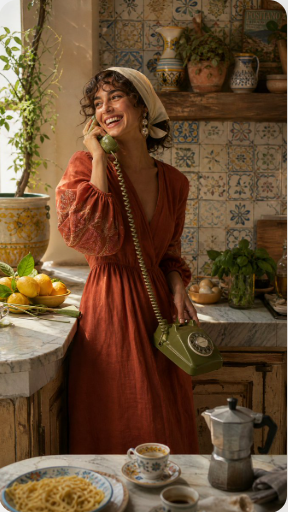
9:16 Create a beautiful young Italian woman with olive-fair skin, warm brown eyes, and curly dark bob hair.She wears a luxurious terracotta linen dress with embroidered sleeves, vintage pearl earrings, and a cream head scarf.She is laughing while holding an avocado green rotary telephone beside an old marble kitchen counter filled with fresh lemons, herbs, espresso cups, and handmade pasta.Background features colorful ceramic tiles, rustic wooden shelves, Mediterranean sunlight, and warm earthy tones.Luxury lifestyle editorial, Dolce Vita aesthetic, cinematic realism, Leica photography, ultra photorealistic.
2.Use the uploaded portrait only as the identity reference
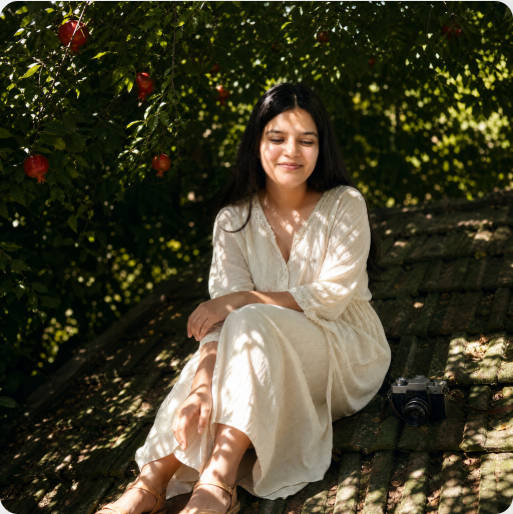
Use the uploaded portrait only as the identity reference. Preserve the person’s real facial features, face shape, skin tone, and recognizable hairstyle. Do not copy the original outfit, background, pose, lighting, or image quality from the uploaded portrait.Create a realistic cinematic portrait of the same person sitting quietly on an old green-tiled rooftop under dense tree shadows. The person is relaxed, looking slightly downward with a soft calm expression. Surround the scene with dark green foliage, hanging red pomegranate fruits, scattered sunlight, and natural leaf-shaped shadows across the face, body, and roof tiles. Add a vintage handheld camera placed casually nearby as a storytelling detail.Choose an outfit that best matches the person’s appearance and personality, different from the scene inspiration: natural, clean, elegant, lightweight, and suitable for a dreamy outdoor summer portrait. Keep the styling tasteful and realistic.Low-angle composition, full-body or three-quarter body framing, cinematic natural light, strong contrast between deep shadow and bright sun patches, soft film grain, subtle lens flare, dreamy atmosphere, realistic skin texture, natural body proportions, authentic photography, shallow depth of field, poetic summer mood, high-detail editorial photo, no text, no logo, no watermark.Negative Prompt:watermark, logo, text, Chinese characters, AI-generated mark, over-smoothed skin, plastic skin, fake face, anime style, cartoon style, 3D render, doll-like face, distorted body, bad anatomy, extra fingers, missing fingers, deformed hands, deformed feet, unnatural legs, awkward pose, blurry face, low resolution, harsh filter, over-sharpened, messy composition, duplicated person, wrong identity, copied outfit from input portrait, copied background from input portrait.
3.Ultra-realistic cinematic portrait of a beautiful young Caucasian woman
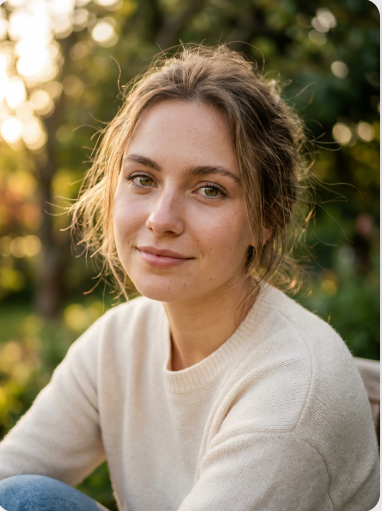
“Ultra-realistic cinematic portrait of a beautiful young Caucasian woman, 20 years old, natural fair skin with fine texture and subtle imperfections, soft freckles across nose, warm golden hour sunlight from the side, detailed catchlights in hazel eyes, windswept light brown hair with flyaway strands, minimal natural makeup, soft bokeh background of outdoor greenery, shot on 50mm lens f/1.8, shallow depth of field, film grain, warm color grading, photorealistic skin with subsurface scattering, sharp focus on eyes, 8k detail”Negative: cartoon, plastic skin, overexposed, blurry, deformed features, artificial glow, CGI, low detail
4.Dreamy sunlit portrait of a young woman with long soft light-brown hair
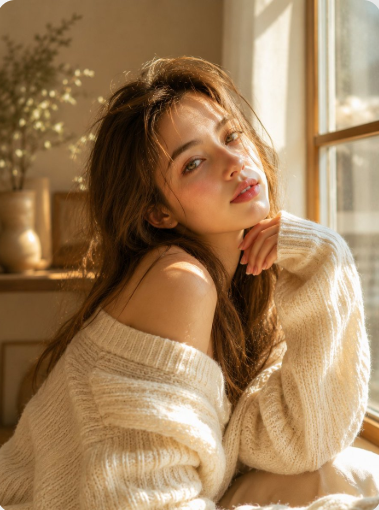
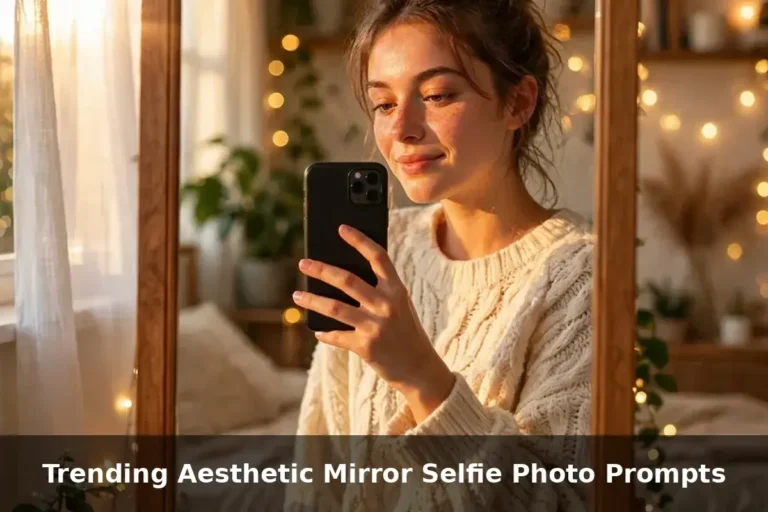
Dreamy sunlit portrait of a young woman with long soft light-brown hair, delicate facial features, fair luminous skin, natural rosy lips, and expressive hazel-green eyes. Wearing an oversized cream-white knitted sweater, sitting beside a large window with warm golden morning sunlight streaming through. Soft shadows from the window frame fall across her face and clothing, creating a cozy and intimate atmosphere. Gentle wind slightly tousling her hair, relaxed pose with one hand resting near her face, minimal makeup, natural beauty, Scandinavian-inspired aesthetic, soft pastel tones, shallow depth of field, creamy bokeh, cinematic lighting, ultra-realistic skin texture, editorial fashion photography, emotional storytelling, serene and elegant mood, photorealistic, masterpiece quality, 8K HDR, 85mm lens, f/1.4.
Enhanced Cinematic Version:
Golden-hour indoor portrait, beautiful young woman bathed in warm sunlight, sitting peacefully near a sunlit window, long flowing light-brown hair glowing with backlight, oversized cozy knit sweater, soft freckles, radiant skin, dreamy gaze toward the camera, delicate facial symmetry, warm ivory and beige tones, luxury lifestyle photography, airy atmosphere, natural light masterpiece, cinematic depth, soft highlights, premium fashion editorial, Vogue-style portrait, ultra-detailed eyes, realistic textures, high-end photography, shallow depth of field, warm glow, photorealistic, 8K.
Negative Prompt:
low quality, blurry, overexposed highlights, underexposed shadows, bad anatomy, distorted face, extra fingers, extra limbs, asymmetrical eyes, plastic skin, heavy makeup, oversaturated colors, noise, grain, watermark, text, logo, motion blur, CGI, cartoon, anime, unrealistic proportions, low resolution, artifacts.
Style Keywords:
golden hour, cozy aesthetic, soft sunlight, dreamy portrait, warm glow, cream sweater, editorial photography, Scandinavian minimalism, airy atmosphere, natural beauty, cinematic realism, luxury lifestyle
5.Top-down cinematic editorial photo
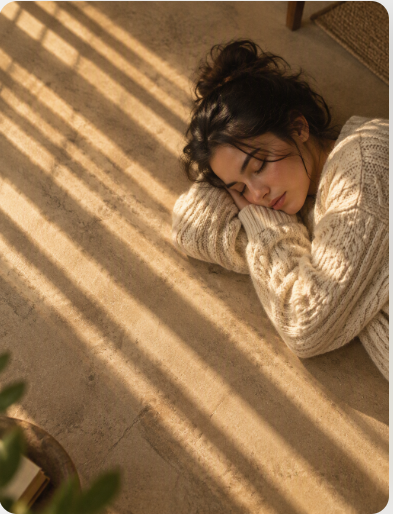
Top-down cinematic editorial photo, young woman with dark hair in messy bun lying on side on warm beige textured floor, wearing cozy oversized cream cable-knit sweater, head resting on folded arms, eyes closed peaceful nap, warm golden hour sunlight through window blinds casting diagonal striped shadows across floor and sweater, soft film grain, shallow depth of field, large empty negative space on left side, intimate quiet afternoon mood, photorealistic, 8k, natural skin texture, soft natural light, serene, minimalist interior
6.Edit the photo of the woman into a medium-shot portrait
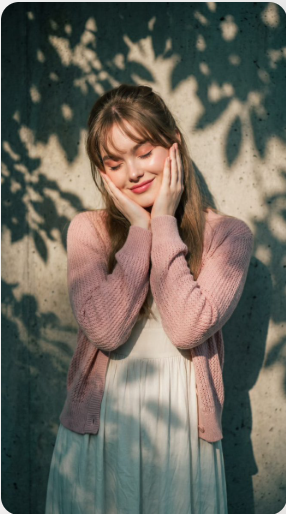
Edit the photo of the woman into a medium-shot portrait of a beautiful young woman.She has straight light brown hair styled half-up, with the remaining hair flowing naturally to her shoulders. Soft wispy bangs cover part of her forehead, while loose strands on both sides gently frame her face.Makeup: Soft Korean-inspired pink makeup featuring subtle pink-peach eyeshadow, naturally curled eyelashes, a light soft pink blush, delicate highlights on the cheekbones and bridge of the nose, and glossy soft pink lipstick.Outfit: She is wearing an ivory white maxi dress with thin shoulder straps, paired with an open-knit pastel pink cardigan.Expression & Pose: She gently cups both cheeks with her palms while smiling with her eyes closed. Her head is slightly tilted to one side, creating a cute, sweet, and playful expression.Background & Lighting: The background is a textured cement or concrete wall. The most prominent visual element is dramatic dappled sunlight filtering through tree leaves or branches, casting organic leaf-shaped shadows across the wall, her face, and her clothing.Color Grading & Mood:
Aspect Ratio: 9:16.
7.Create a finished premium editorial campaign poster

Create a finished premium editorial campaign poster, 9:16, full bleed. Real hard-sunlight editorial photography interwoven with monumental flat warm-cream extra-condensed elastic typography.Direct hard natural sunlight with sharp shadows, rich deep-toned background (navy, teal, dark plum, or deep earth), and a single vibrant natural color accent. Clean authentic textures, no grunge, no artificial distressing.Monumental extra-condensed heavy uppercase sans-serif letters act as active spatial architecture. The letters stretch, lean, and smoothly warp their baselines to mirror the movement, radial groove, or physical trajectory of the scene while remaining 100% readable.Integrate photography and typography through purposeful depth overlap: the subject or object physically intersects or passes across the cream lettering to establish clear spatial depth.Headline: “HANG LOOSE”
Subject & Action: A relaxed person lying in a woven hammock, one arm and one bare foot dangling over the edge, the hammock sagging deep under their weight.
Setting & Palette: Deep teal shade under palms, hard sunlight cutting through in sharp leaf shadows; the single accent is the saffron-yellow hammock.
Type Path & Warp: The headline sags along the same catenary curve as the hammock, the middle letters dipping lowest and stretching taller, the outer letters leaning up toward the anchor points.
Depth Overlap: The hammock fabric and the dangling arm pass in front of the lowest middle letters, while the hammock ropes run behind the outer letters.Render cream lettering in flat fill (#F5E9C8) with smooth clean edges; no 3D extrusion, no bevel, no drop shadow, no outlines, no fake brand logos, no filler copy.
8.Create a modern 3D promotional poster using my uploaded photo

Create a modern 3D promotional poster using my uploaded photo as the facial reference. Preserve my exact facial features, skin tone, and face shape. Place me sitting confidently on a stylish oversized dark green sculptural chair, wearing dark green sweatshirt and sweatpant outfit with white sneakers. Use a clean gradient green background with soft abstract 3D shapes, floating glossy spheres, and subtle studio lighting.
Add large, bold white typography behind me that reads “JULY”, with elegant handwritten text above it saying “Welcome to”. Do not include any other text, logos, dates, watermarks, or branding. The composition should be minimal, premium, vibrant, and social-media-ready with a luxury graphic design aesthetic, ultra-sharp details, soft shadows, photorealistic quality, and 8K resolution.
Pro Tips to Get Better Results From Every Gemini Couple Photo Prompt
A good prompt is a strong start, but small habits make the difference between an average edit and one you want to share. These tips come from the way AI photo tools generally respond to instructions.
Be Specific About the Setting
“Beach” is a start, but “a quiet beach at golden hour with soft waves and warm sand” gives Gemini far more to work with. Mention the place, the time of day and one or two background details. Specific scenes produce more believable results than general ones.
Describe the Light
Lighting changes the entire feeling of a photo. Words like soft, warm, diffused, moody, backlit or candlelit tell Gemini what kind of atmosphere you want. If you skip lighting, the tool will guess, and the guess may not match your idea.
Ask Gemini to Keep Faces and Features Natural
Add a short line asking the tool to keep both people’s faces, hairstyles and skin tones consistent with the original photo. This does not guarantee a perfect match, but it reduces the chance of a result that looks like strangers. If the first attempt drifts, repeat the request in a follow-up.
Change One Thing at a Time
If you change the background, outfits, colour grading and pose in a single message, the tool may handle some changes well and ignore others. Start with the biggest change, then add smaller adjustments in follow-ups. This keeps you in control.
Match the Mood to the Pose
A playful laughing photo does not suit a dramatic, serious cinematic scene. A calm, close pose suits a candlelit dinner or a snowy cabin. Choose a theme that fits the energy already present in your original picture.
Mention the Outfit Only When You Want It Changed
If you like your current clothes, say so. If you want a different outfit, describe colours and style in simple words, such as “a cream sweater and a dark coat.” Clear clothing instructions help avoid strange or mismatched details.
Use Follow-Up Messages Wisely
Short, focused corrections work better than long rewrites. Say what to keep and what to change, for example “keep the pose and the outfits, but make the background more blurred.” Treat the chat as a conversation rather than a one-shot command.
Keep a Personal Prompt Notebook
When a result turns out well, save the exact wording in a note on your phone. Over time you will build your own collection of tested instructions, which saves effort the next time you want a fresh look.
Think About Where You Will Use the Photo
If the image is for an Instagram post, mention a portrait or vertical frame. If it is for a wedding card or banner, mention a wider frame with some empty space. Planning the format early avoids awkward cropping later.
Write in Plain, Natural Language
You do not need technical photography terms. Write the way you would explain the scene to a friend. A simple, natural gemini couple photo prompt is often more effective than one packed with jargon, because the tool responds well to clear descriptions of what you see in your mind.
Test Two or Three Versions
Run the same idea with small changes, such as a different time of day or a different outfit colour, and compare the results side by side. Testing a few versions of your gemini couple photo prompt helps you notice which words have the biggest effect, and that knowledge carries over to every future edit.
Common Mistakes to Avoid When Using a Gemini Couple Photo Prompt
Even a great idea can fall flat if the instruction or the input is weak. Watch out for these common problems.
Writing a Vague Prompt
Short instructions like “make us look beautiful” are open to interpretation. The result may be pretty but unrelated to what you pictured. Describe the scene, the light and the mood instead.
Overloading One Message
Long messages that stack ten different requests often confuse the result. Pick the main change and let follow-up messages handle the rest. A focused instruction is easier for the tool to follow.
Starting With a Low Quality Photo
Blurry, tiny or heavily filtered photos give the AI very little real information. If the faces are unclear in the original, they will probably look off in the edit as well. Always begin with the clearest picture you have.
Ignoring Small Details in the Result
Hands, fingers, jewellery, text on signs and the edges of clothing are common trouble spots. Zoom in before you share anything. If something looks strange, ask for a correction or try again.
Expecting a Perfect First Attempt
Even experienced users usually go through a few rounds. Think of the first result as a rough draft rather than the final image. A little patience pays off.
Copying a Prompt Without Adjusting It
A copied prompt describes someone else’s idea of a couple. Change the colours, location and style so it fits your own photo and personality. Personal touches make the result feel real instead of generic.
Forgetting About Privacy and Consent
Couple photos are personal. Do not upload pictures of people who have not agreed to it, and think carefully before sharing edited images publicly. It is also wise to check the privacy settings of the tools you use.
Forcing a Theme That Does Not Fit the Photo
Putting a smiling, brightly lit daytime photo into a dark, dramatic rain scene often looks unnatural. Every gemini couple photo prompt has a mood, so pick one that is close to the energy of your original picture. Matching the two saves you several rounds of corrections.
Alternative Tools for Couple Photo Edits
Gemini is a popular choice, but it is not the only one. If you want to compare results or Gemini is not available to you, these two tools are worth a look. Features, limits and pricing change often, so check each tool’s current options before you decide.
- ChatGPT: It lets you upload a picture and describe edits in everyday language, similar to the workflow described above. Many people use it to compare the same instruction across two different tools.
- Canva: Its AI photo features suit people who also want design tools in one place, such as adding text or turning the image into a card or a social media post.
When you compare tools, use the same photo and the same gemini couple photo prompt for each one. That is the only fair way to judge. You may find that one tool is better for realistic portraits while another is better for stylised or illustrated looks.
Trying the same idea in more than one tool is a smart way to find which one understands your style best.
FAQs About Gemini Couple Photo Prompts
What is a Gemini couple photo prompt?
It is a written instruction you give Gemini along with a photo of two people. The instruction tells the tool how to change the background, lighting, outfits or overall style of the picture. Most people use it for anniversary posts, wedding ideas, profile pictures and gifts.
Is it free to use Gemini for couple photo edits?
Gemini offers free access with certain limits, but availability and features depend on your region, account and plan. Open the app and check what is available to you right now.
Can I use the same prompt for any couple photo?
Yes, as a starting point. Just adjust the details, such as outfit colours, location and mood, so the instruction matches your own photo. A few small edits make a big difference.
Why do the faces look different after editing?
AI tools sometimes change facial details, especially when the original photo is blurry, dark or heavily filtered. Use a clear photo, ask the tool to keep faces and features natural, and try a follow-up message if the first result drifts.
How long should a prompt be?
A few clear sentences usually work well. Mention the setting, lighting, mood and any outfit changes without piling on too many extras. Clear and focused beats long and messy.
Can I use the edited photos commercially?
Rules depend on the tool’s terms and the laws where you live, so check the current terms before using edited images for business purposes. I am not a lawyer, and it is always best to read the official policy.
Is it safe to upload couple photos to an AI tool?
Think of any upload as sharing personal data. Avoid sensitive or private images, only upload photos of people who agree, and review the privacy settings of the tool you use.
Final Thoughts on the Gemini Couple Photo Prompt
A thoughtful Gemini couple photo prompt can turn an ordinary snapshot into a romantic, cinematic or festive portrait without a studio or a single editing skill. Start with a clear photo, choose a theme that matches your mood, customise the details and refine the result with short follow-up messages.
Now it is your turn. Pick one of the 12 themes above, upload your favourite picture and test your first gemini couple photo prompt today. Save the versions you love, and keep experimenting until you find the style that feels like the two of you.